AltoDocs
AltoDocs product

All the apps engineers need — inside one live document.

MathCanvas, sheets, Python, markup, CAD — embedded in the document itself, not juggled between apps. The automation modules fill it for you: loads, member analysis, SBi 271, and best-practice blocks.

Get AltoDocs freeTry the live demo
The workspace

Everything an engineering document is made of.

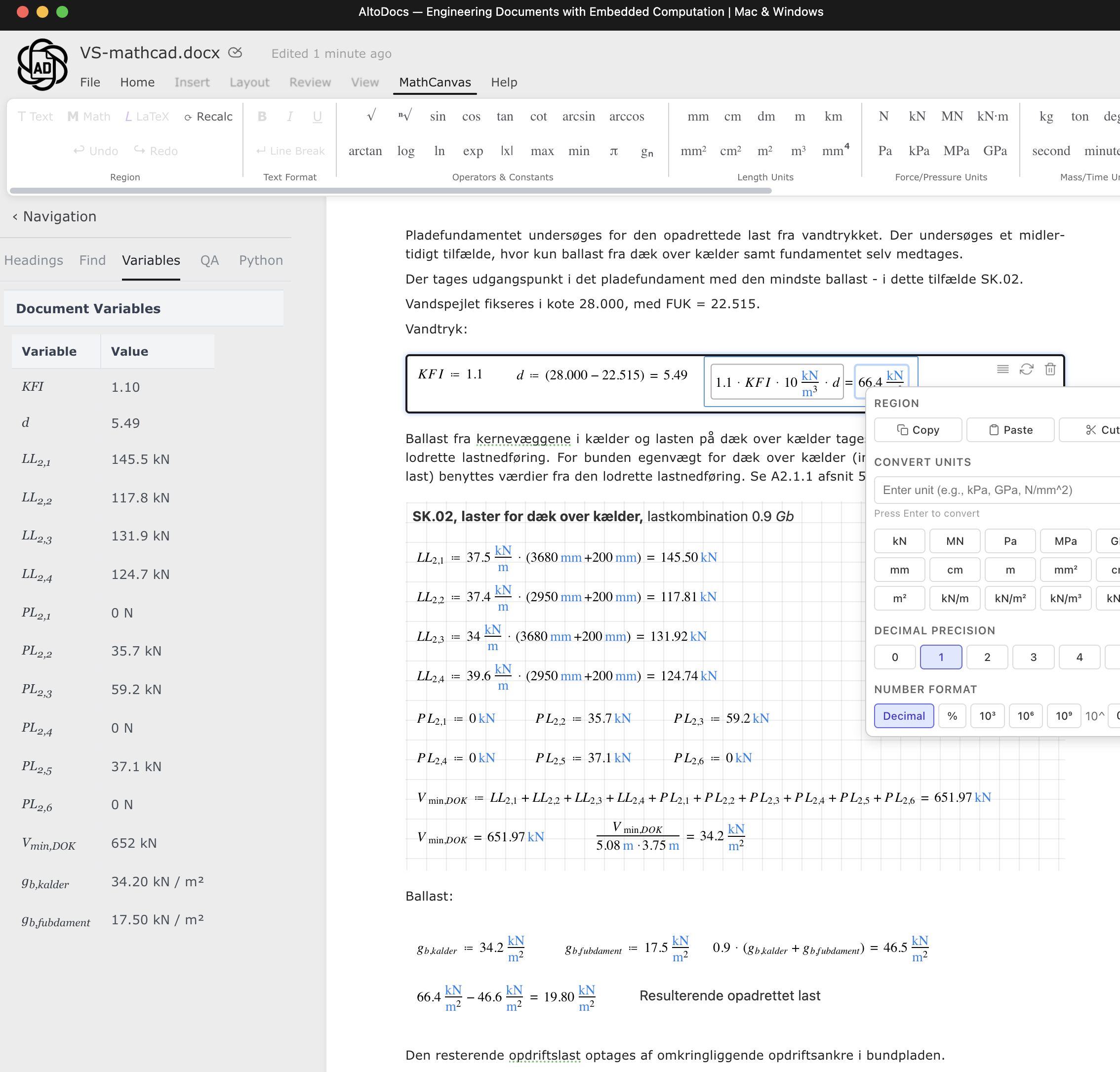
MathCanvas

Your report is the calculation.

Write the engineering narrative around unit-aware variables, equations, tables, and reusable checks. When an input changes, dependent results change with it.

  • Inline and block equations
  • Automatic unit checking
  • Reactive dependencies
MathCanvas
A real AltoDocs structural calculation document with live variables and unit-aware equations
A real foundation calculation authored in AltoDocs.
Calculation sheets

Keep familiar calculation sheets in context.

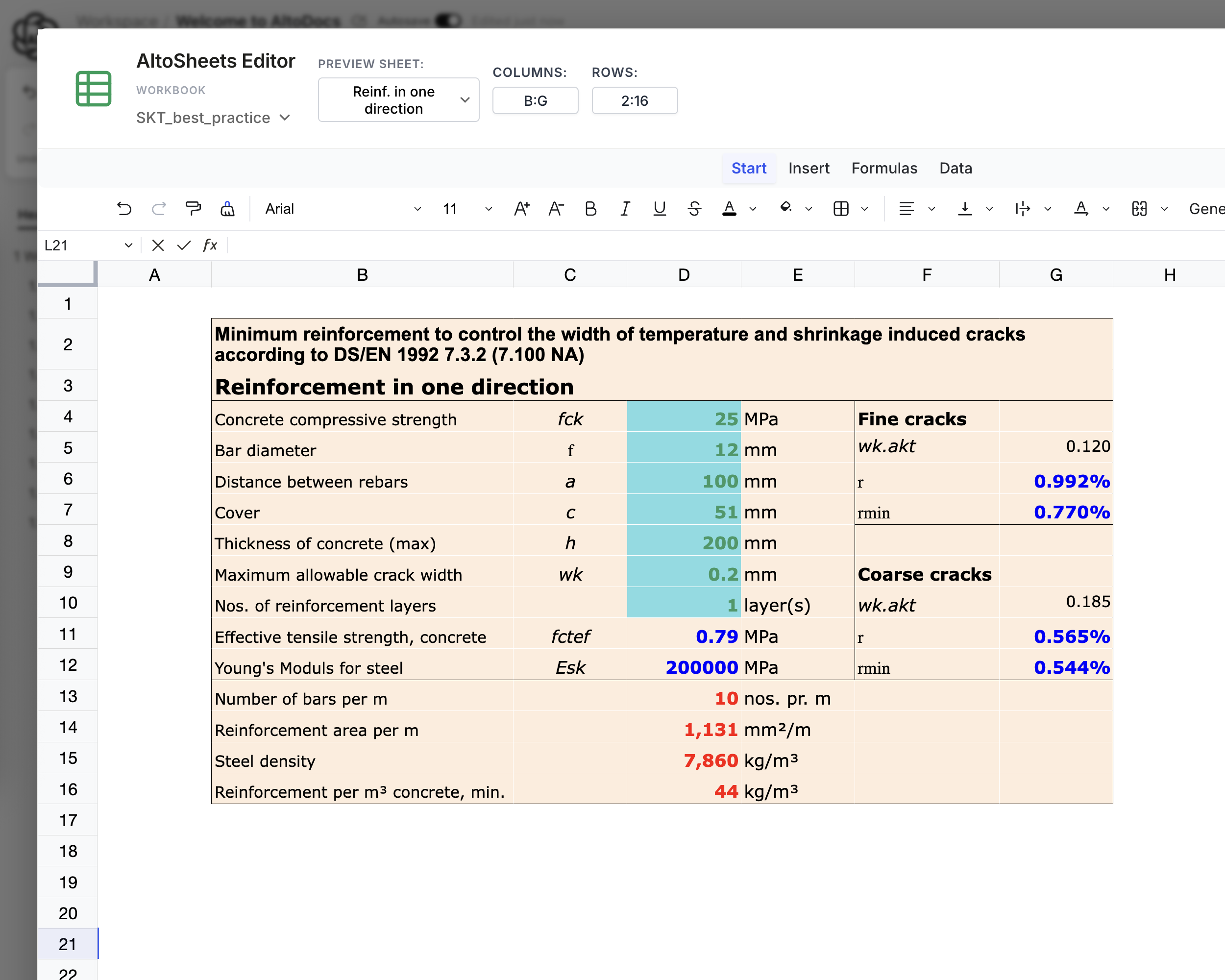
Open and edit engineering workbooks inside the document, then place the calculation output beside the narrative that explains it.

  • Embedded workbook editing
  • Calculation sheets in the report
  • One reviewable deliverable
Calculation sheets
An engineering workbook embedded in an AltoDocs document
The workbook embedded inside the report.
Python

A notebook that lives in your report.

Embedded Python, notebook-style — script against your document’s variables and data, and keep the output beside the code that produced it.

  • Notebook-style Python
  • Script against document data
  • Outputs stay beside the code
Python
Notebook-style Python inside an AltoDocs document
Notebook-style Python inside the document.
MarkupCanvas

Put the number back on the structure.

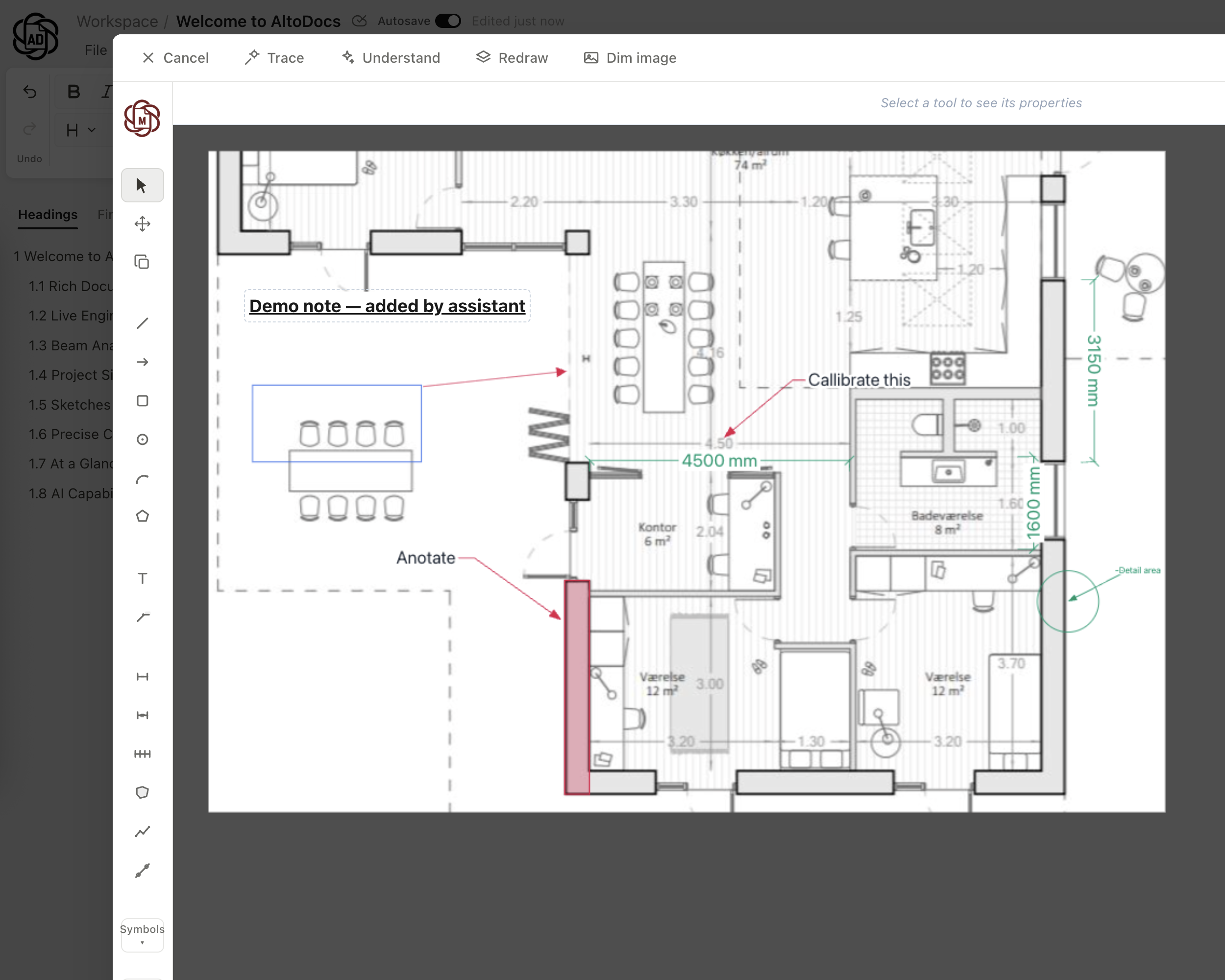
Open technical drawings and structural models beside the document. Add vector markups, dimensions, and calculation-linked notes without flattening the source.

  • DWG, PDF, and IFC context
  • Scale-calibrated measurements
  • Markup, dimensions, and callouts
MarkupCanvas
Annotating a drawing in AltoDocs MarkupCanvas
Notes and callouts placed directly on the drawing.
AltoCad

Production-ready 2D drawings.

A real 2D CAD engine inside the workspace — draw details and drawing sheets to the same standard as the rest of the deliverable, and issue them together.

  • Native 2D drafting
  • Details and drawing sheets
  • Issued together with the report
AltoCad
2D drafting in AltoCad
Native 2D drafting inside the workspace.
Collaboration

One report, the whole team.

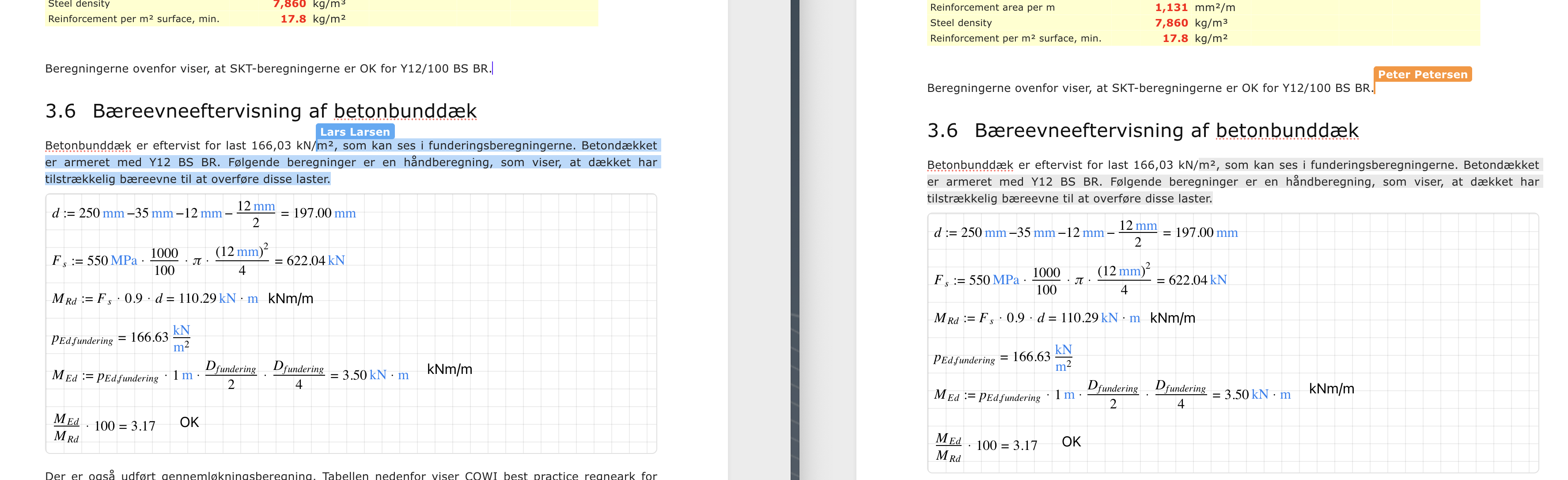
Everyone edits the same document at the same time — live selections, shared state, no file versions to merge. Built for engineering content, not just text.

  • Real-time co-editing
  • Live cursors and selections
  • One shared document
Collaboration
Two engineers co-editing an AltoDocs document
The whole team editing the same document, live.
Review

Review the decision, not a screenshot.

Anchor comments to the exact calculation or drawing, resolve them where they were raised, and preserve the revision context behind the issued result.

  • Anchored comment threads
  • Revision context preserved
  • Clean, issueable output
Review
Comment threads anchored to an AltoDocs calculation
Comments anchored to the exact calculation.
Quality assurance · on the roadmap

Assurance built into the workspace.

A dedicated QA module is on the roadmap: systematic checks, sign-off, and the documentation trail a verified deliverable deserves.

  • Planned checks and sign-off
  • Documentation trails
  • Built for verified delivery
Quality assurance · on the roadmap
Planned quality checks in AltoDocs
Systematic checks across the deliverable.
Automation modules

The modules that do the boring hours.

Loads module

Wind, snow, and combinations — in minutes.

Define loads from presets instead of empty spreadsheets: wind and snow zones, imposed loads, and automated load combinations that follow the rules for you.

  • Wind and snow loads
  • Automated load combinations
  • Presets and templates
Loads module
Wind and snow load presets in AltoDocs
Wind and snow loads from presets.
Member analysis module

Every member, checked in place.

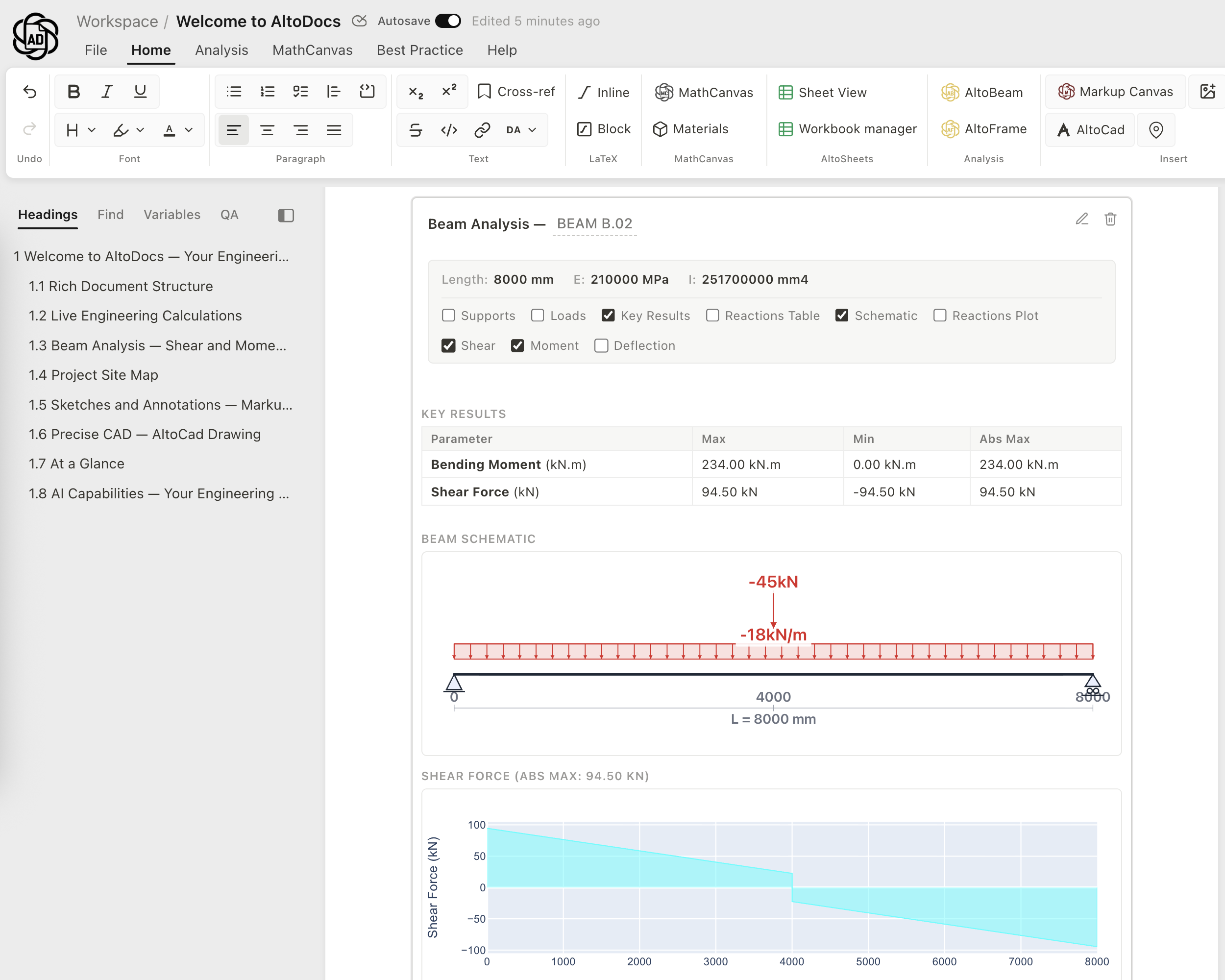
Run the verification where you write: beams, frames, columns, stringers, walls, and foundations — the results land in the document beside the loads that produced them.

  • Beams, slabs, and frames
  • Columns and walls
  • Foundations
Member analysis module
A beam check inside an AltoDocs document
Beam checks where you write.
SBI 271 documentation automation

A- and B-documentation, automated.

SBi 271 presets, templates, and STR logic generate the structural documentation Danish projects require — cutting a week of documentation work down to an hour.

  • A- and B-documentation
  • Presets and templates
  • STR logic automation
SBI 271 documentation automation
Automated A-documentation from SBi 271 presets in AltoDocs
A-documentation generated from presets.
Best-practice blocks

Save it once. Insert it anywhere.

Save any section — the text, the MathCanvas calculations, a sheet, a figure — as a best-practice block, then call it into any report. Your office’s best work becomes a building block everyone can use.

  • Mix text, calculations, sheets, and figures
  • Save once, reuse in every report
  • Still editable after inserting
Best-practice blocks
Saving a best-practice block in AltoDocs
Save a section as a reusable block.

Start with the next calculation.

Get AltoDocs freeTry the live demo